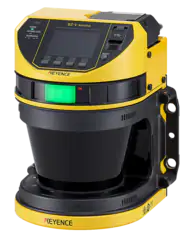
1. Dirty or contaminated lens (most common) Over time, dust, oil mist, coolant residue, or fine debris can build up on the scanner lens. Even a light film can interfere with the scanner’s ability to accurately emit and receive laser signals, triggering the 0410 error.
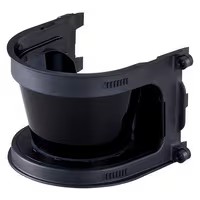
How to clean it properly:
- Use a soft, lint-free cloth.
- Clean with mild detergent and water
- Gently wipe—do not scrub.
Avoid aggressive cleaners such as Windex, Simple Green, alcohol-based solvents, or industrial degreasers. These products can damage the lens coating and make the problem worse over time.
2. Scratched or permanently damaged lens If the lens has been cleaned correctly and the error continues, the lens may be scratched, etched, or clouded. This can happen from:
- Improper cleaning methods
- Abrasive airborne particles
- Accidental contact during maintenance
In this case, cleaning will not resolve the issue.
The fix:
- Replace the lens (typically secured with four fasteners)
- Ensure the replacement lens is the Keyence brand replacement, be sure to have your scanner part number available.
- Re-verify scanner alignment and safety zones after replacement.
Best Practice Recommendation
After cleaning or replacing the lens:
- Power-cycle the scanner
- Confirm the error clears.
- Validate safety functionality before returning the machine to operation.
If the fault remains, consult PowerSafe Automation technical support to rule out internal optical or hardware issues.
Why This Matters for Machine Safety
A safety laser scanner error is more than a nuisance…it is an indication that the device cannot reliably protect personnel. Addressing the lens condition proactively helps prevent nuisance faults, unexpected downtime, and potential safety compliance issues.
Preventive Maintenance Checklist for Keyence Safety Laser Scanners
A simple preventive maintenance routine can eliminate most nuisance faults, including the 0410-error code before they shut down production.
Recommended PM Frequency:
- Weekly in dusty, oily, or washdown environments
- Monthly in clean, climate-controlled areas
Safety Laser Scanner PM Checklist:
- Verify scanner is powered down and in a safe state.
- Inspect lens for dust, oil film, coolant mist, or residue.
- Clean lens using:
- Mild detergent + water
- Soft, lint-free microfiber cloth
- Do NOT use:
- Windex
- Simple Green
- Alcohol, acetone, or degreasers
- Check lens for scratches, clouding, or etching.
- Inspect lens fasteners (typically 4) for tightness.
- Confirm scanner alignment and mounting rigidity.
- Verify no physical obstructions in the protective field.
- Restore power and confirm no active error codes.
Pro Tip: Document lens inspections as part of your machine safety PM logs…this supports audit defensibility and trend tracking.
Cleaning vs. Replacing the Lens: How to Decide
Not every 0410 error means a replacement—but knowing when cleaning is no longer enough prevents repeated downtime.
Cleaning Is Sufficient When:
- Lens appears clear with light residue.
- No visible scratches or hazing
- Error clears after proper cleaning and power cycle
Lens Replacement Is Required When:
- Scratches are visible under good lighting.
- Lens looks cloudy or permanently hazed.
- Error returns immediately after cleaning
- Scanner struggles to maintain stable protective fields.
Lens Replacement Notes:
- Lens is typically secured with four fasteners.
- Use only OEM-approved replacement lenses.
- After replacement:
- Reconfirm alignment.
- Validate safety zones.
- Perform functional testing before returning to service.
Rule of Thumb: If cleaning fixes the issue once but the error returns quickly, replacement is usually the correct long-term solution.
How Scanner Faults Tie Back to OSHA & ANSI Expectations
A safety laser scanner throwing an error is not just a maintenance issue, it is a compliance and risk exposure issue.
OSHA Perspective (29 CFR 1910.212)
OSHA expects safeguarding devices to:
- Function as designed.
- Remain effective at all times.
- Not be bypassed or ignored due to nuisance faults.
A scanner with a known optical fault cannot be considered reliable safeguarding, even if the machine “seems” safe.
ANSI B11 Expectations
ANSI B11 standards emphasize:
- Functional reliability of safeguarding devices
- Preventive maintenance programs
- Documentation of inspections and corrective actions
Repeated scanner faults without corrective action can be interpreted as:
- Inadequate safeguarding maintenance
- Failure to manage foreseeable hazards.
Why This Matters During Audits
Auditors often ask:
- “How do you maintain your safeguarding devices?”
- “How do you respond to recurring faults?”
- “Is there documentation showing corrective action?”
A documented lens cleaning and replacement protocol helps demonstrate:
- Due diligence
- Risk reduction (not just mitigation)
- A proactive safety culture
Final Takeaway
The 0410-error code on a Keyence safety laser scanner is most often a lens condition issue, either contamination or damage.
The fix is usually straightforward, but the impact of ignoring it is not.